In recent weeks iSolutions at the University of Southampton have been responding to a persistent phishing campaign targeting the student community. This threat is more sophisticated than usual and unfortunately, it has already resulted in several compromised student accounts.
Here’s what’s happening, how the scam works, and the key signs to look out for.
What’s Going On?
A threat actor is sending phishing emails to students using compromised accounts from other universities. Because these emails come from genuine .ac.uk addresses and often contain a SharePoint link, they can appear trustworthy at first glance.
Once a student is tricked into entering their login details, their account is taken over and used to send more phishing emails to others at the University, especially those promoting a so‑called “giveaway”.
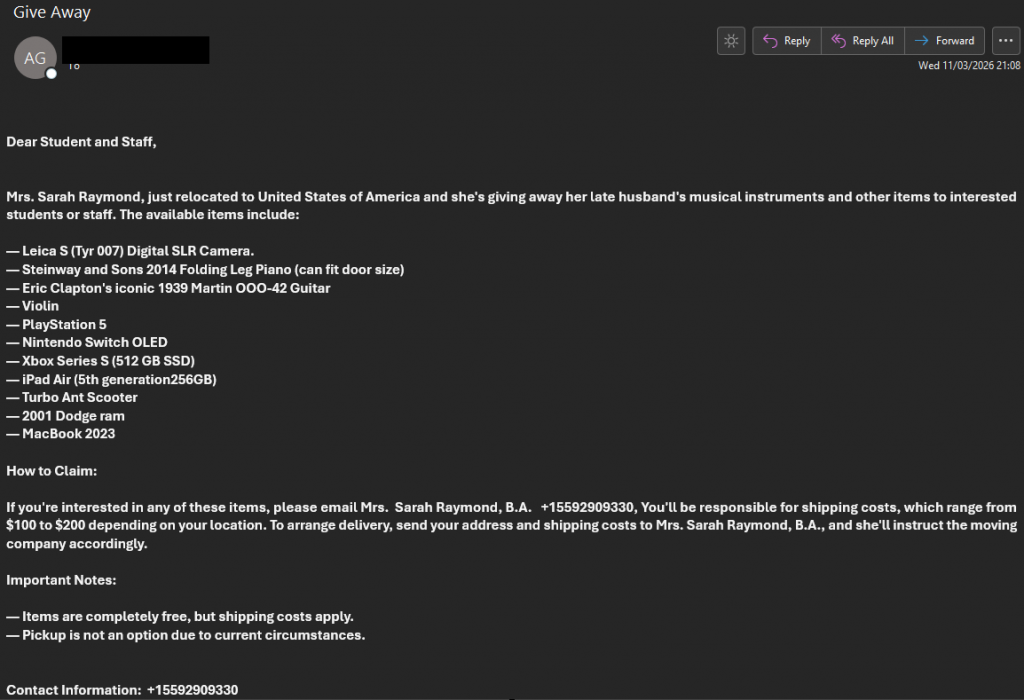
The ‘Giveaway’ Scam Explained
After gaining access to a student account, scammers often follow up with an email offering free high-value items. These messages are carefully crafted to look legitimate and lower your guard.
Here’s how they typically work.
1. The Hook: Emotional Story + Too‑Good‑To‑Be‑True Giveaways
Scammers often open with a believable but fabricated personal story designed to generate sympathy. Common themes include:
- “I’ve recently relocated…”
- “These items belonged to my late husband…”
They then list high-value, highly desirable items, such as:
- MacBooks
- PlayStations
- Professional cameras
These unrealistic giveaways are meant to tempt you into acting quickly without questioning them.
2. The Mechanic: ‘Free Items, Just Pay Shipping’
Here’s the heart of the scam:
- The scammer claims the items are free and you only need to pay shipping, often between £100–£200.
- Once you pay, you receive nothing.
- Pickup is never allowed, removing any way to confirm the items even exist.
If it sounds too good to be true… it is.
3. Social Engineering Tricks
These messages are designed to look legitimate and university‑related. You might notice:
- Emails addressed broadly to “Students and Staff”
- A sender using a believable name, sometimes with professional‑sounding credentials like “B.A.”
- Messages coming directly from a compromised student email account, adding to the illusion of authenticity
4. Red Flags in the Contact Details
If you look closely, there are several warning signs:
- International phone numbers included in the message
- Requests for your home address, which can lead to data harvesting
- Attempts to move the conversation to @gmail.com or @outlook.com accounts
- Switching to a phone call to take payment
- Bank details that don’t match the name of the person emailing
If anything feels inconsistent, stop and double‑check before responding.
How to Protect Yourself
You can find general guidance on avoiding scams here:
And if you ever receive a message you’re unsure about:
- Do not click any links
- Do not reply or provide personal information
- Report it immediately to iSolutions
- Delete the message once reported